Residential and Commercial Security System Provider for Minneapolis & St. Paul, MN
Do you own a home or business in the Minneapolis, Minnesota, area? Protecting your property against threats like burglary, vandalism and theft requires a robust security system from a trusted provider. With more than 50 years of combined security experience, Minneapolis-area-based Lloyd Security understands what it takes to keep you and your property safe. Whether you want to protect your family or your employees, our team is here to help.
As one of the most knowledgeable and respected security system companies in Minneapolis, we can provide an assortment of high-quality products and services that will give you peace of mind.
Custom Security Systems for Businesses and Homes
As the Minneapolis area’s best security provider, Lloyd Security takes pride in creating customized solutions that meet your specific safety and security requirements. Our commitment to quality drives us to offer the highest-quality, most state-of-the-art products, including:
- Alarm systems
- Intrusion detection devices
- Access control systems
- Video cameras
Beyond these systems, we provide a host of additional security products. You’ll find equipment from all the leading brands, ensuring the best quality and the most reliable performance.
Unlike competing security system companies that try to sell you the most expensive gadgets on the market, we recommend only products that address your home or business’s unique challenges. Because our company has decades of combined experience, our team is uniquely equipped to assess your home or business and determine which solutions will provide the most security for your property. Once you decide on the best system for your needs, you can trust us to provide high-quality technology and stellar service.
Service Sets Us Apart From Other Security Companies
We support our equipment with the best customer service in the area. You can count on us for fast, efficient installation of your new system — and we’ll make sure you understand how to use it properly. We also offer an array of monitoring solutions, so you can know what’s happening in and around your property on a 24/7/365 basis.
No wonder Lloyd Security is the best choice for security systems for businesses and homes in Minneapolis and across Minnesota.
Security Systems for Businesses in MN
Lloyd Security has provided alarms and related security systems for businesses ranging from small retail storefronts to large hospitals, office buildings, warehouses and more. Companies throughout Minneapolis and St. Paul have relied on Lloyd Security for years as their commercial security provider. Depending on your needs, we can put together a complete security package consisting of a combination of the following products and services:
- Intrusion detection systems: This technology detects opening doors and windows and glass breakage to indicate when an intruder has entered your property.
- Access control systems: Provide keycards to authorized users or control who can access your building — and when — remotely.
- Video cameras: Cameras deter many intruders, and their recordings can serve as vital evidence in the event someone breaks into the building.
- Video surveillance systems: A total video surveillance system will provide comprehensive monitoring for the interior and exterior of your property.
- Video verification: Advanced security equipment is highly reliable, but video verification provides an extra layer of peace of mind by eliminating false alarms.
Home Security Solutions for Minneapolis & St. Paul Residents
We’re also the top Minneapolis residential security solutions provider. We can design and install a state-of-the-art home security system that will protect your family and property from all types of security threats and give you additional peace of mind. As with our commercial systems, our residential security offerings include intrusion detection, access control, video surveillance and video verification, as well as 24/7/365 remote monitoring to identify and respond to a potential issue as soon as it occurs,
At Lloyd Security, we believe that our customers deserve more than a “one-size-fits-all” security approach to serve their best interests. Understanding that no two properties are alike and that every homeowner’s security needs are different, we’re able to develop a customized home security system that addresses your most daunting challenges.
Professional Security System Installation
Even the highest-quality commercial or residential security system won’t keep you safe and protect your property if it isn’t installed correctly. As one of the top security companies in the Minneapolis and St. Paul area, Lloyd Security can perform a fast, flawless installation.
No setup project is too large or small for us — we can handle everything from apartments and single homes to the complex layouts required to secure shopping malls, hospitals, government buildings, hotels and industrial facilities.
Unlike many other security companies in Minnesota, we recognize that each home, facility or commercial building is unique from a security perspective. We’ll tailor our installation services to ensure your system handles even the most complex security challenges.
At Lloyd Security, we’ve served Minnesota communities since 2002. We understand the unique circumstances that necessitate new technology, such as growing your business or adding onto your house. Whether you need our team to install a security system in your home or business for the first time or you want to alter or replace your system, we have the expertise to help.
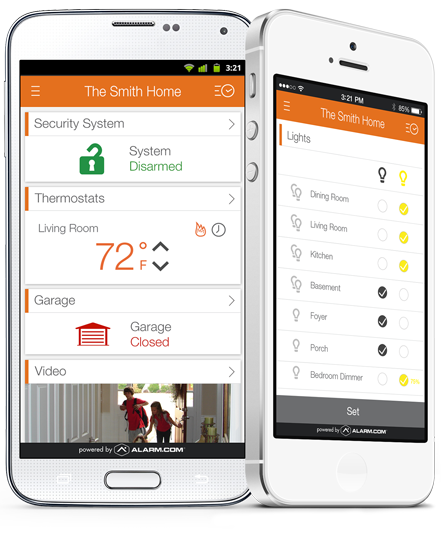
Control Your Home Security System & Alarms From Anywhere
The same advanced technology in our commercial alarm systems is available for your home, too. We are a leader among residential Minneapolis alarm companies in matching homeowners with the tools they need to stay safe. In addition to security alarm systems, we offer smoke and fire alarms and carbon monoxide detectors.
Our all-in-one mobile app puts complete home automation right at your fingertips, with no complicated menus to navigate or codes to memorize. Our intuitive, easy-to-use app is available for:
- iPad
- iPhone
- Windows Phone
- Android devices
This technology enables you to view live and recorded video surveillance feeds, receive instant alerts and set up custom alerts via your smartphone or tablet.
You can also control your home security system features with just a couple of taps while you’re at work or on the go. Use your app to:
- Monitor activity — like who comes and goes — inside and outside your home.
- Adjust the thermostat to ensure you return to a comfortable environment and save energy.
- Control lights and other smart fixtures remotely.
Our mobile apps work with our access control systems so you can detect and prevent unauthorized entry into your home. You’ll be able to lock and unlock doors with our home automation app. Our system is used by homeowners throughout Minneapolis and St. Paul, Minnesota.
Commercial and Residential Security System Monitoring Services
Even with the wide variety of innovative technologies, such as instant alerts and the ability to view surveillance camera feeds remotely via tablet or smartphone, you can’t always be available to keep an eye on your property. Fortunately, Lloyd Security can remove the burden. We offer affordable, professional around-the-clock monitoring services, along with video verification that ensures the prompt dispatching of first responders when needed.
What’s more, you don’t have to purchase your security system from Lloyd Security or have us install it to benefit from this offering — our monitoring services are also available to anyone who already has a solution in place!
Maintenance and Support
Our reputation as one of the best security companies in Minneapolis and St. Paul, Minnesota, has been built on our commitment to our customers. When you buy a residential or commercial security system from us, we’ll be there to support you for years to come. We’ll show you how to operate your new system and maximize its various features and benefits.
As a Minnesota security provider, we are fully devoted to our customers. Our experienced technicians can perform routine preventive maintenance to ensure your system remains in peak operating condition. We can also execute small or more extensive repairs if needed. And when the time comes for a security system upgrade, we’ll be there to recommend the best products and handle the entire installation process.
Explore Your Residential or Commercial Security System Options
Do you want to fully protect your home or business and get more peace of mind? One call to our Minnesota security systems company is all it takes. Get started by arranging your free consultation with the Lloyd Security team today. Reach us by phone at 612-874-9295 or contact us online to request a quote.
Reviews From the Web
Great firm to work with. When we met, they really listened to my needs and what I thought I wanted. They got back to me a few days later with some thoughts of their own based on my situation, and gave options. Definitely 5-stars and two thumbs up.
-Partrick A.
My favorite partner to work with. I have referred friends and family to them and all have had a top-notch experience and love their systems. If you are looking for a partner and a top-notch security solution, Lloyd Security is the way to go!
-Joe T.